Alerts Summary
The Alerts Summary section of the Global Dashboard surfaces the most recent unresolved alerts across your entire PostgreSQL fleet, allowing you to identify and act on critical events without leaving the dashboard.

What Is Displayed
The Alerts Summary shows the most recent active alerts with the following columns:
| Column | Values | Description |
|---|---|---|
| Severity | WARNING / CRITICAL | Alert severity level |
| Type | e.g. Agent Down, Agent Degraded, Component Degraded, ... | Category of the alert condition |
| Title | — | Short title of the alert |
| Message | — | Detailed description of the alert condition |
| Occurrences | Number | How many times this alert has been triggered |
| First Seen | Timestamp | When the alert was first triggered |
| Last Seen | Timestamp | When the alert was last triggered |
| Actions | Delete | Remove the alert from the list |
Severity Levels
| Severity | Color | Meaning |
|---|---|---|
| CRITICAL | 🔴 Red | Serious condition requiring immediate attention |
| WARNING | 🟡 Yellow | Potential issue to monitor closely |
Alert Types
Alert types reflect the nature of the detected condition. Examples include:
| Type | Meaning |
|---|---|
| Agent Down | The agent on a monitored server is unreachable |
| Agent Degraded | The agent is running but reporting degraded performance |
| Component Degraded | A specific collector or component is not functioning correctly |
Additional alert types may appear depending on the monitoring conditions detected by the platform.
Navigating to the Full Alert List
The Alerts Summary shows only the most recent alerts. To see the complete list, click View All Alerts or navigate to Alerts in the top navigation bar.
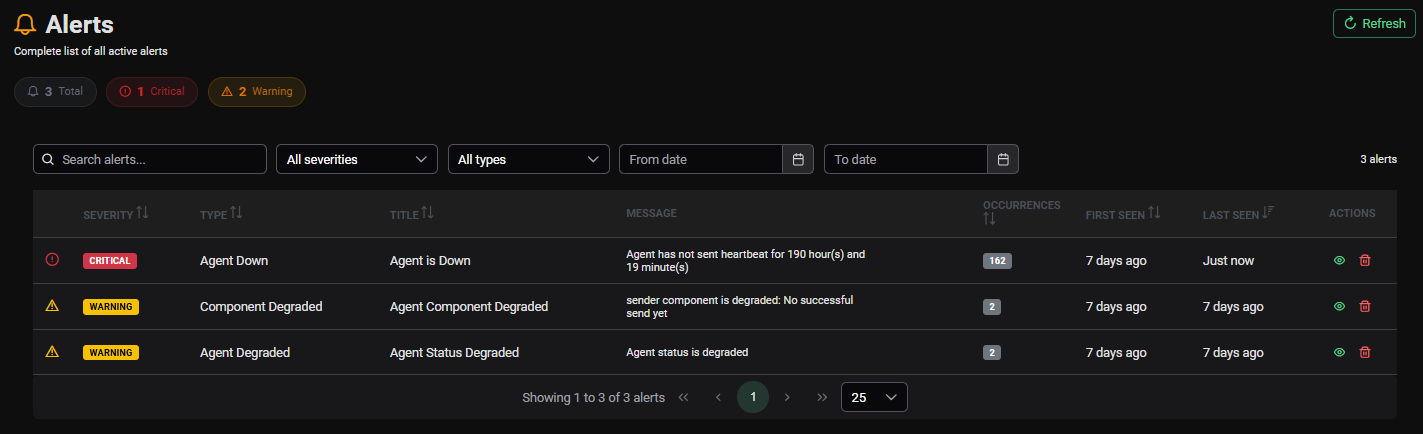
See Managing Alerts → for the full alerts page documentation.
No Alerts State
When there are no active alerts across the fleet, the Alerts Summary section displays a confirmation message indicating all monitored servers are operating normally.