Global Dashboard
The Global Dashboard is the main entry point of PMP4PG. It provides a single-pane-of-glass view of your entire PostgreSQL fleet — statuses, KPIs, active alerts and environment breakdown at a glance.
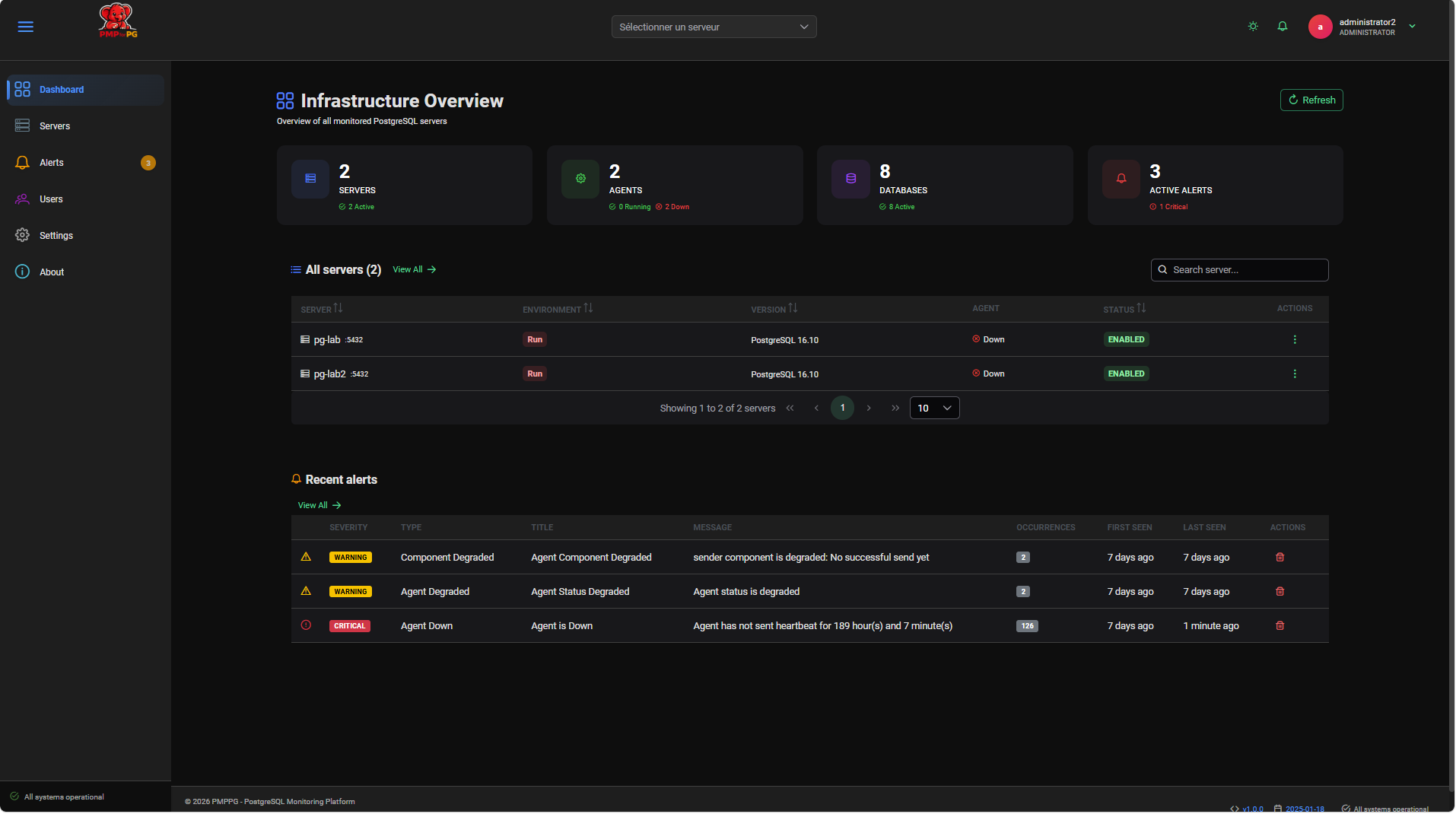
Dashboard Sections
The Global Dashboard is organized into four main areas:
┌──────────────────────────────────────────────────────────┐
│  KPI Cards                                               │
│  [Total Servers] [Active] [Inactive] [Error] [Alerts]   │
├──────────────────────────────────────────────────────────┤
│  Alerts Summary                                          │
│  Recent unresolved alerts across the fleet               │
├──────────────────────────────────────────────────────────┤
│  Servers Grid                                            │
│  All monitored servers with status and metrics           │
└──────────────────────────────────────────────────────────┘
Accessing the Dashboard
The Global Dashboard is the first page displayed after login. You can return to it at any time by clicking the PMP4PG logo or the Dashboard link in the top navigation bar.
Auto-Refresh
The Global Dashboard refreshes automatically every 30 seconds to reflect the latest server statuses and agent heartbeats. You can trigger an immediate refresh by clicking the Refresh button in the top-right corner of the page.