WAL Trends
The WAL tab tracks the evolution of Write-Ahead Log generation, write performance and full page image activity over the selected time period. WAL trends are essential for understanding write workload intensity and planning disk, replication and backup capacity.
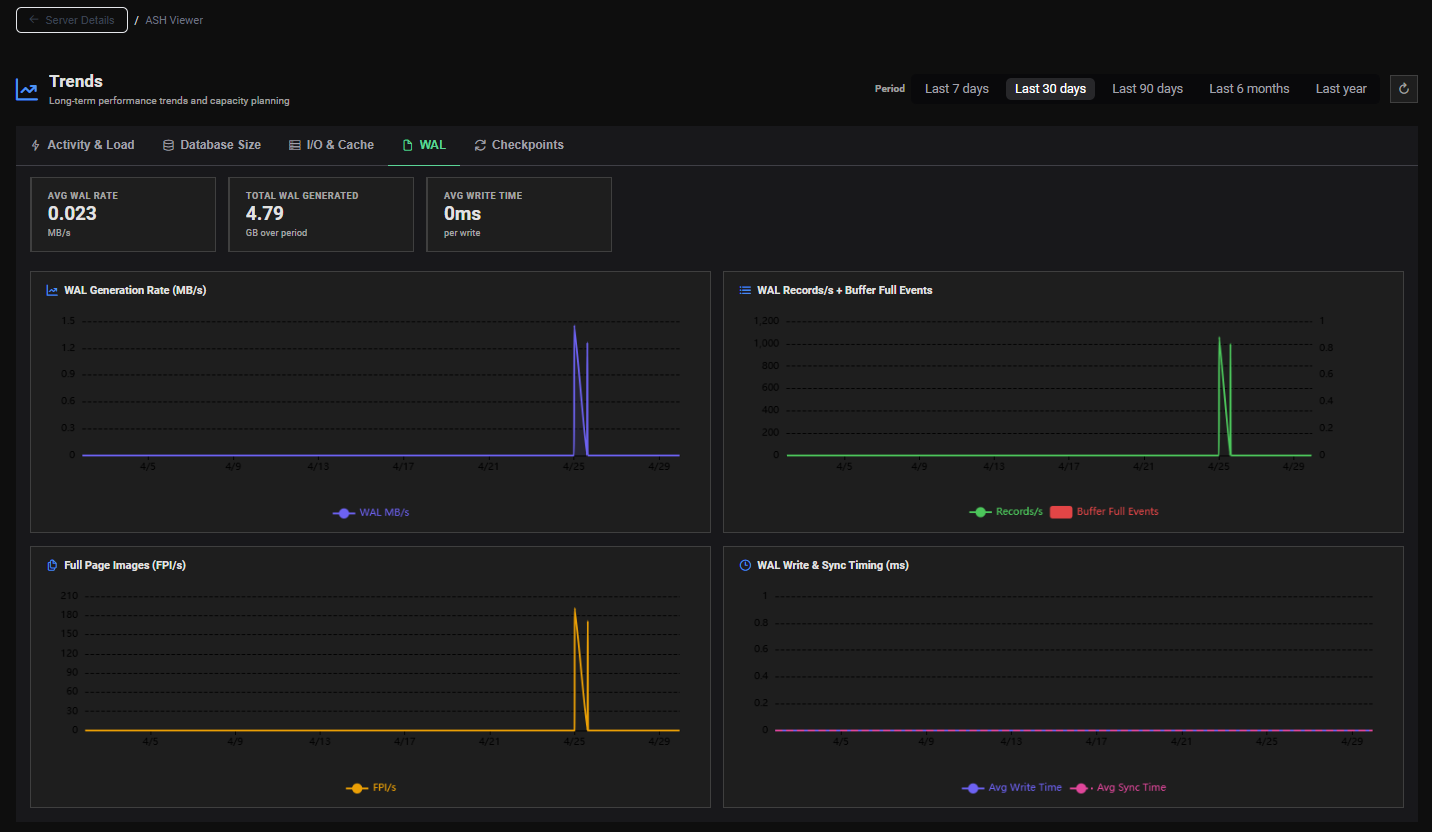
KPI Summary Cards
Three summary cards display period-wide WAL statistics:
| Card | Unit | Description |
|---|---|---|
| Avg WAL Rate | MB/s | Average WAL generation rate over the selected period |
| Total WAL Generated | GB | Total WAL volume produced during the period |
| Avg Write Time | ms/write | Average time per WAL write operation |
Charts
Chart 1 — WAL Generation Rate (MB/s)
A line chart showing the WAL generation rate in MB/s over time.
Use for:
- Tracking write workload intensity over days, weeks or months
- Identifying regular patterns (batch jobs, nightly ETL, end-of-month peaks)
- Detecting unexpected WAL spikes from runaway processes or bulk operations
- Planning WAL storage volume and replication bandwidth
- Validating that a workload optimization reduced WAL generation
WAL must be shipped to each standby replica. A sustained high WAL rate increases replication lag risk, especially over slow or congested network links. Monitor this trend alongside replica lag metrics.
Chart 2 — WAL Records/s + Buffer Full Events
A dual-line chart showing:
- WAL Records/s — number of WAL records written per second
- Buffer Full Events — number of times the WAL buffer had to be flushed early because it was full
Use for:
- Understanding WAL write frequency vs. volume (many small records vs. few large ones)
- Detecting WAL buffer pressure — frequent buffer full events indicate the WAL buffer is undersized
Frequent WAL buffer full events cause synchronous WAL flushes that bypass the normal write batching, increasing I/O latency for user transactions. If this trend is growing, consider increasing wal_buffers in postgresql.conf:
wal_buffers = 64MB # default is auto-tuned to ~1/32 of shared_buffers
Chart 3 — Full Page Images (FPI/s)
A line chart showing the rate of Full Page Images written to WAL per second.
Understanding FPI
After each checkpoint, the first modification of any data page must be written in full to WAL (not just the change delta). These are called Full Page Images (FPI). They ensure crash recovery correctness but increase WAL volume significantly.
Use for:
- Detecting periods of high FPI rate that inflate WAL volume
- Correlating FPI spikes with checkpoint frequency (more checkpoints = more FPIs)
- Validating that reducing checkpoint frequency (via
max_wal_size) also reduced FPI overhead
FPI rate is directly proportional to checkpoint frequency. If the FPI/s trend is high and growing, check the Checkpoint & WAL Statistics section in the AWR Viewer — frequent Requested checkpoints (triggered by max_wal_size) are the likely cause.
max_wal_size = 2GB # increase to reduce checkpoint frequency
Chart 4 — WAL Write & Sync Timing (ms)
A dual-line chart showing the average time for WAL write and WAL sync operations in milliseconds over time.
| Metric | Description |
|---|---|
| WAL Write Time | Time to write WAL records to the OS page cache |
| WAL Sync Time | Time to flush WAL from the OS page cache to disk (fsync) |
Use for:
- Detecting I/O latency degradation on the WAL disk over time
- Identifying storage performance regressions after hardware or configuration changes
- Correlating WAL sync time increases with checkpoint activity peaks
- Validating that a storage upgrade improved WAL write performance
High or growing WAL sync time indicates that the storage device is struggling to keep up with fsync requests. This directly impacts transaction commit latency — every COMMIT must wait for WAL to be synced to disk (when synchronous_commit = on).
Options to investigate:
- Move WAL to a dedicated faster disk
- Consider
synchronous_commit = offfor non-critical workloads (risk of losing last few transactions on crash) - Use a storage device with a battery-backed write cache
Interpretation Guide
Growing WAL Rate Without Growing TPS
WAL volume is increasing faster than transaction count. This may indicate:
- Queries generating more data modifications per transaction (larger updates, bulk operations)
- Increasing FPI rate due to more frequent checkpoints
- A new application pattern writing large rows or using
bytea/JSONB columns
WAL Rate Spikes at Regular Intervals
Regular WAL spikes typically correspond to scheduled batch jobs, nightly ETL processes or periodic autovacuum runs on high-churn tables. Verify by cross-referencing the spike timestamps with the Activity & Load tab (TPS spikes) and VACUUM Statistics in the AWR Viewer.
Sustained High WAL Sync Time
The WAL I/O subsystem is saturated. Cross-reference with the Checkpoint & WAL Statistics section in the AWR Viewer and the Wait Events section for WALWrite or WALSync waits.